Learn everything about Groundwork Simulator heavy hauling mechanics, terrain navigation, transport strategies, and machinery logistics in early access.
Stepping into the world of industrial earthmoving requires patience, precision, and a deep understanding of heavy equipment dynamics. Mastering Groundwork Simulator heavy hauling is essential if you want to turn a rugged landscape into a profitable gold-mining operation.
Whether you are navigating steep slopes with a massive payload or organizing your worksite fleet, effective Groundwork Simulator heavy hauling dictates whether your operation runs smoothly or grinds to a frustrating halt. In this comprehensive guide, we will break down the strategies, physics, and logistics required to dominate transport on your worksite.
Understanding the Heavy Hauling Mechanics
Heavy transport in simulation games is rarely just about pressing the gas pedal and driving forward. In this title, logistics play a massive role. You cannot simply teleport your machinery from one side of the map to the other; you have to load, secure, and drive it.
When executing Groundwork Simulator heavy hauling, players must carefully line up their excavators and heavy assets onto lowboy trailers. Community reports emphasize that precision is key during the loading phase. If your alignment is slightly off, you risk rolling equipment off the trailer or struggling with weight distribution.
| Transport Step | Action Required | Key Challenge |
|---|
| Staging | Position the trailer on stable, flat ground | Avoiding soft mud and uneven slopes |
| Loading | Drive or winch machinery onto the deck | Maintaining proper crawler/wheel alignment |
| Securing | Fasten equipment for transit | Preventing shift during acceleration or braking |
| Hauling | Navigate routes to the new destination | Managing traction and center of gravity |
According to developer insights available on the official Steam Store Page for Groundwork Simulator, every piece of equipment carries distinct weight properties that directly affect your truck's performance. You have to plan your route carefully before putting the truck in drive.
Battling Terrain Physics and Traction
The terrain you drive across is entirely dynamic. Every scoop of earth you take with your excavator alters the landscape, cutting new trenches, steepening hillsides, and creating shifting piles of loose material. This means your transport routes are never permanent.
When performing Groundwork Simulator heavy hauling, mud, loose gravel, and steep grades will constantly test your driving skills. Player experience indicates that attempting to haul a heavy load up an unpaved slope without enough momentum or traction will leave your truck spinning its wheels.
| Terrain Type | Hauling Difficulty | Recommended Approach |
|---|
| Packed Dirt | Low | Maintain steady speed; standard routes |
| Loose Gravel | Medium | Avoid sharp turns; keep momentum steady |
| Deep Mud | High | Clear the path first; use alternative routing |
| Steep Slopes | Extreme | Approach straight on; manage low gears |
Sometimes, the most important part of Groundwork Simulator heavy hauling isn't the driving itself—it is fixing the road beneath your wheels. Grading a smooth path with a bulldozer before sending a heavy transport truck through can save you hours of recovery time.
Coordinating Solo and Co-Op Logistics
Running a successful mining site requires more than just digging up dirt; it requires a seamless chain of custody for materials and machinery. While you can handle everything yourself, sharing the workload in online co-op opens up fantastic multiplayer logistics opportunities.
In a co-op setup, delegating tasks makes heavy transport far more efficient. One player can focus entirely on excavation and loading, while another specializes in Groundwork Simulator heavy hauling to shuttle equipment and concentrated material across the sprawling map.
| Role | Primary Responsibilities | Synergy with Hauling |
|---|
| Excavator Operator | Digging, shaping terrain, loading trucks | Prepares equipment for transport |
| Transport Driver | Hauling machinery and site supplies | Keeps workflow moving between zones |
| Wash Plant Manager | Processing gold concentrate, water systems | Relies on steady material delivery |
Coordinating your machines transforms an untouched, chaotic patch of dirt into a well-oiled industrial zone. Communication is vital—always let your transport driver know when a heavy rig is loaded and ready to move.
Before diving deep into transport logistics, you need to ensure your gaming rig can handle the intense computations under the hood. The developers have noted that the game's detailed soil deformation and fluid dynamics place a heavy load on your processor.
Even if the visual style looks deceptively straightforward, the physics engine is working overtime to calculate every scoop of dirt and water flow. Below is a quick overview of what your system needs to run the simulation smoothly:
| Hardware Component | Minimum Requirement | Recommended Requirement |
|---|
| Operating System | Windows 10 (64-bit) | Windows 11 (64-bit) |
| Processor (CPU) | Intel Core i5-8400 / AMD Ryzen 5 2600 | Intel Core i5-12400 / AMD Ryzen 5 5600 |
| Memory (RAM) | 16 GB | 24 GB |
| Graphics (GPU) | NVIDIA GTX 1070 (8 GB VRAM) | NVIDIA RTX 3060 / AMD RX 6600 |
| Storage Space | 10 GB available SSD space | 10 GB available SSD space |
If you notice stuttering or frame drops while managing massive convoys or altering large sections of the terrain, lowering background CPU tasks can drastically improve your hauling experience.
Frequently Asked Questions
How do I load heavy machinery onto trailers safely?
Line up your trailer on level ground to prevent rolling. Approach slowly, center your tracks or tires on the deck, and secure the vehicle completely before putting the transport truck in motion to avoid tipping your load.
Why is my transport truck struggling to drive up hills?
Heavy loads drastically alter your vehicle's center of gravity and traction. If you are stuck in mud or on a steep slope, try approaching the grade head-on, or use a bulldozer to flatten and pack down the route before attempting the haul again.
Can I practice heavy hauling in multiplayer co-op?
Yes! Online co-op allows you to divide labor. You can have one player focus on Groundwork Simulator heavy hauling while another manages excavation, making complex site logistics much easier to handle.
Does terrain deformation affect my transport routes?
Absolutely. Every time you dig trenches or reshape hillsides, your driving paths change. Managing your site's geography is just as important as driving skill when keeping your supply lines open.

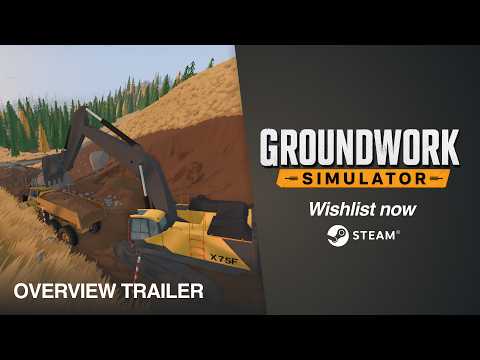 Official mediaLearn everything about Groundwork Simulator heavy hauling mechanics, terrain navigation, transport strategies, and machinery logistics in early access.YouTube